The best AI clipping tool in 2026 is Opus Clip for most creators, because it is the only one whose clip selection works on footage without a talking head, and the one with the most built around the clip: a virality score, auto-posting, b-roll, an API and a mobile app. Vizard is the better deal per minute and the better reviewed. Klap is the cheapest way in. Submagic has the best captions. Riverside is the pick if you record the long video yourself. The rest of this article explains what each one costs for an hour of video, where each falls short, and the one setting all five get wrong by default.
We sell TikTok views, likes and followers, which is a different product from the ones on this page. No tool below has reviewed or approved what we say about it, and every price and limit is taken from the vendor’s own pricing page or help centre on 22 October 2026. Where vendors contradict themselves, we say so. The videos embedded below are independent reviewers’ own, chosen because they show the tool working on real footage; we did not make them and they are not ours to vouch for.
The five, in one paragraph each
- Opus Clip: free plan with 60 credits a month, paid from $15 a month, 1 credit per minute of source video, clips any genre, posts to TikTok, Reels and Shorts. Best overall.
- Vizard: free plan with 60 credits, Creator at $29 a month or $14.50 billed yearly for 600 credits, 4K export, Trustpilot 4.7 from 2,522 reviews. Best value.
- Klap: from $14 a month billed yearly for 100 clips, no recurring free plan, public API on every plan. Best cheap entry.
- Submagic: captions from $19 a month, clipping as a $19 add-on for 10 uploads, 123 caption languages. Best captions.
- Riverside Magic Clips: clipping included on every plan including the free one, from $24 a month billed yearly without the watermark. Best if you record there.
What an AI clipping tool is, and what it is not
An AI clipping tool takes a long video, a podcast, a webinar, a stream, a Zoom call, finds the moments it thinks will hold attention, cuts them into vertical clips, adds captions and reframes the shot so the speaker stays in the middle. You upload an hour and get back a list of 30-second candidates with a score next to each.
Three things separate it from a video editor.
- The tool chooses, you approve. The work is in the selection, not the cutting. A tool that picks the wrong 30 seconds has done nothing for you, however pretty the captions.
- Everything is metered. Four of the five bill by the minute of source video you upload, whether you use the clips or not. The fifth bills per clip. Either way the price on the page is not the price per usable clip.
- The clip is raw material. It still has to open in the first second and hold to the end, which is the subject of our guides to TikTok hooks and watch time. The tool gives you a candidate. The feed decides.
The market for this exists because short-form video is where the return is. HubSpot’s 2026 State of Marketing has 49% of marketers naming short-form video the format with the highest ROI, ahead of long-form at 29%. YouTube said Shorts passed 200 billion daily views in June 2025, with the caveat that it had just loosened what counts as a view. Everyone who has an hour of footage wants thirty clips from it, and that is the job these tools sell.
How we ranked them
Five criteria, applied the same way to each tool, from published pricing, help-centre limits and public reviews rather than from a demo the vendor controlled.
- What an hour of source video really costs. Not the headline price, but the price divided by the minutes or clips it buys, on the plan a solo creator would actually pick.
- Selection quality on different footage. Whether the tool can clip a stream or a vlog, or only a person talking to a camera.
- What the free plan is for. Whether you can test on your own footage without a watermark, and for how long the output survives.
- Captions and reframing. Languages, accuracy claims, and whether the reframe tracks a moving subject or just crops the centre.
- What is around the clip. Scheduling, direct posting, b-roll, API, team seats. The things that turn a clip generator into a workflow.
We did not score “users” claims. Opus says 20 million, Vizard says 10 million, Klap says 3.5 million, Submagic says 4 million businesses. None of those numbers is audited and none tells you whether the tool will pick the right 30 seconds of your video.
1. Opus Clip: best overall
Opus Clip is the tool the category is named after in most people’s heads, and the one that has built the most around the clip. It is not the cheapest and it is not the best reviewed. It is first because of one capability and one ecosystem.
- Best for: creators and small teams who clip more than talking heads and want posting, scheduling and b-roll in the same place.
- Pricing: Free, 60 credits a month, 1080p, watermarked, no editing, and clips stop being exportable after 3 days. Starter $15 a month, monthly only, 150 credits. Pro $29 a month or $14.50 a month billed yearly ($174), 300 credits a month, in packs you can stack. Business on quote. One credit is one minute of the video you import.
- An hour of source: $6.00 on Starter, $2.90 on Pro yearly.
- Selection: ClipAnything, which Opus says turns “vlogs, gaming, sports, interviews, explainer videos” into clips, with a prompt box to tell it what to look for. A Virality Score from 0 to 99 built on hook, flow, value and trend, on paid plans only.
- Captions: 25 languages listed on the homepage, “over 97% accuracy” claimed. Brand vocabulary and curse-word censoring on Pro.
- Reframe: ReframeAnything, with moving-subject tracking and a screenshare or gameplay layout on Pro.
- Around the clip: auto-post to TikTok, Reels and Shorts from Starter; a scheduler, six social connections, AI image and stock b-roll, dubbing, export to Premiere and DaVinci, Zapier, an API and a Claude connector on Pro. iOS and Android apps.
- Ratings: 4.0 on Trustpilot from 510 reviews, 64% five-star and 20% one-star; 4.6 on G2 from 123; 4.9 on the App Store from 8,300 ratings; 2.8 on Google Play from 321.
Why it is first. Every tool on this list can find the good bit of a podcast, because a podcast has a transcript and the transcript tells the model where the point is. Opus is the only one that advertises, and prices, clip selection on footage with no transcript worth reading: a stream, a match, a vlog. If your long video is two people talking, this advantage is worth nothing. If it is anything else, it is the whole decision.
The second reason is what happens after the clip. Opus posts to the three platforms directly from the cheapest paid plan, schedules on Pro, adds b-roll, exports a timeline to a real editor, and has an API and mobile apps. Nobody else on the list has all of those, and for a creator producing every day, the clip is maybe a third of the work.
Where it falls short. Price per minute. Pro yearly is $14.50 for 300 credits; Vizard charges the same $14.50 for 600. The free plan is a demo, not a plan: watermarked, no editing, and clips that disappear after three days. Starter has no yearly price. The one-star reviews cluster on two things, credit upsells (“every time you turn around, they want you to buy more credits”) and cancellation, with one reviewer describing sixteen emails. The Google Play rating of 2.8 is the lowest of any app on this page. And the pricing page contradicts its own help centre on whether yearly credits arrive monthly or all at once, which matters if you plan to binge-clip a back catalogue.
Verdict: the right tool if your footage is not a talking head, or if you want the clip, the post and the schedule in one subscription. Pay yearly for Pro and ignore Starter. The credit rules, the no-refund terms and what 510 reviewers say are in our full Opus Clip review.
2. Vizard: best value
Vizard is the tool to pick if your long video is people talking and you want the most minutes for the least money, from the company with the best public reviews in the category.
- Best for: podcasters, interviewers and anyone clipping talking-head video at volume.
- Pricing: Free, 60 credits a month, 720p export, watermarked, projects expire after 3 days. Creator $29 a month or $14.50 billed yearly ($174) for 600 credits a month, 4K export, no watermark, six social accounts. Business $39 or $19.50 yearly, 20 accounts, brand kit, team seats. One credit is one minute. Credits roll over for 2 months on monthly plans and 13 months on yearly.
- An hour of source: $1.45 on Creator yearly, $2.90 monthly. Half of Opus at the same price point.
- Selection: AI clipping with a virality score and a minimum-score filter for auto-posting. The July 2026 clip_v2 model returns fewer, better clips at 1.25 times the credit cost. Up to 40 clips from an hour.
- Captions: all plans, with translation. The vendor quotes 30, 50, 100 and 180 languages on different pages, which is the kind of inconsistency to test on your own language before paying.
- Reframe: centres the active speaker automatically, with speaker identification improved in 2026.
- Around the clip: scheduling and direct publishing on paid plans, AI b-roll, brand templates, an API with rate limits on every plan including Free, iOS and Android apps.
- Ratings: 4.7 on Trustpilot from 2,522 reviews, 89% five-star and 2% one-star; 4.7 on G2 from 427; 4.8 on the App Store from 789; 4.5 on Google Play from 7,630.
Why it is second. On the thing most people buy a clipping tool for, talking-head video, Vizard does the job for half the price per minute and is liked more by the people who use it than anything else on this list. Five times the Trustpilot reviews of Opus with a tenth of the one-star share is not noise.
Where it falls short. It does not claim to clip non-speech footage, and the 720p watermarked free plan expires in three days, the same as Opus. The refund policy is the strictest here: seven days, and only if you have not uploaded anything, which the one-star reviews call a money-back guarantee that “only applies if you don’t use it”. Support is the other complaint. And the iOS in-app prices do not match the web prices, so buy on the web.
Verdict: the best deal in the category for talking-head content, and the safest subscription to recommend to someone who asks. If your footage has no speech, go back to number one.
3. Klap: best cheap entry
Klap is a French tool that bills by the clip rather than by the minute, which makes it the cheapest serious option for a creator who uploads a few long videos a month and keeps most of what comes out.
- Best for: solo creators on a budget with sources under 45 minutes, and developers who want an API without an enterprise call.
- Pricing: Basic $14 a month billed yearly for 100 clips, sources up to 45 minutes, HD download. Pro $39 yearly for 300 clips, sources up to 2 hours, 4K, dubbing in 29 languages. Pro+ $94 yearly for 1,000 clips and 3-hour sources. Monthly billing is roughly double: Klap’s own blog puts it at $29, $79 and $189. No recurring free plan; you get one free video to test.
- An hour of source: not possible on Basic, which caps sources at 45 minutes. On Pro, an hour that yields ten clips costs about $1.30 of the plan.
- Selection: clips from a YouTube link or upload with a virality-style score, captions in 52 languages, active-speaker reframing, b-roll.
- Around the clip: publish and schedule to TikTok, YouTube, Instagram and LinkedIn with unlimited social accounts, analytics, and a REST API open on every plan.
- Ratings: 3.9 on Trustpilot from 54 reviews, 54% five-star and 30% one-star; 3.2 on Product Hunt from 6. G2 and Capterra have one or two reviews each, so ignore the scores Klap quotes from them.
Why it is third. Per-clip billing suits the way most small creators actually work: one or two long videos a week, ten clips each. On that pattern Basic’s 100 clips go a long way for $14, and nothing else here is cheaper for a yearly commitment. The open API is unusual at this price.
Where it falls short. The review base is small and a third of it is one-star, mostly about cancelling and about tiers changing without notice. Klap’s own pages still call the plans by old names and quote the old $29 Pro price, and a third-party reviewer found the pricing page showing clips to some visitors and minutes to others. The 45-minute cap on Basic rules out most podcasts. There is no mobile app, and the apps in both stores called “Klap” are from unrelated developers.
Verdict: the cheapest way to find out whether clipping works for your channel, if your sources are short and you pay yearly. Read the terms on refunds before you do.
4. Submagic: best captions
Submagic started as a caption tool and still is one; clipping arrived later as an add-on. It is on this list because when a clip’s captions are the reason people stop scrolling, Submagic’s are the best of the five.
- Best for: creators who already have clips, or cut their own, and want captions, b-roll and hooks that look designed rather than generated.
- Pricing: Starter $19 a month or $12 yearly for 15 videos of up to 2 minutes; Pro $39 or $23 yearly for 40 videos up to 5 minutes; Business $69 or $41 yearly for 100 videos up to 30 minutes, 4K at 60fps. No watermark on any plan, and no recurring free plan. Magic Clips, the long-to-short feature, is a separate add-on that the pricing page does not show: the help centre lists it at $19 a month for 10 video uploads.
- An hour of source: $1.90 per upload on the add-on regardless of length, on top of a base plan from $12.
- Selection: Magic Clips generates “20+” clips per upload with a virality score, from a YouTube link, a file or a Google Drive link.
- Captions: 123 languages, 99% accuracy claimed, animated styles, custom dictionary, and the AI hook titles and b-roll insertion that made its name.
- Around the clip: publishing and analytics on all plans, an API with 100 minutes a month included, a scheduler. No mobile app; the one in the App Store under its name is a third party’s.
- Ratings: 4.5 on Trustpilot from 853 reviews, 87% five-star and 7% one-star; 4.6 on G2 from 85. Submagic’s own site says 4.9 from 2,000 reviews, which is not what the live page shows.
Why it is fourth. For a creator who edits their own clips, Submagic’s captions, hooks and b-roll are a better finish than the caption layer in any of the three tools above it. And the add-on pricing is unusual in a good way: a 3-hour podcast costs the same $1.90 as a 20-minute one.
Where it falls short. It is a captioning product with clipping bolted on, and the bolt shows: the clipping price is in the help centre, not on the pricing page, the add-on caps you at 10 uploads a month, and the base plan’s per-video length limits (2, 5 or 30 minutes) are built for finished shorts. The one-star reviews are about billing: repeated charge attempts and auto-renewals without warning. It has been bootstrapped to $8 million in revenue by a team of about fifteen, which is impressive and also explains the support complaints.
Verdict: the finishing tool. Buy it for captions and b-roll, add Magic Clips if you want one subscription, and know the clipping is the junior feature.
5. Riverside Magic Clips: best if you record there
Riverside is a remote recording studio for podcasts and interviews, and Magic Clips is the clipping feature inside it. For anyone who records their long video rather than importing it, that changes the arithmetic, because the clipping comes included.
- Best for: podcasters and interview channels who record remotely and want clips from the same place without a second subscription.
- Pricing: Free with 2 hours of one-off separate-track recording, 720p, Riverside watermark, Magic Clips included. Pro $29 a month or $24 yearly ($288) for 5 recording hours a month, 4K, no watermark. Grow $39 or $34 yearly for 15 hours, social scheduling and a newsletter. Business on quote with an API.
- An hour of source: included in the recording hours you are already paying for. On Pro yearly, about $4.80 per recorded hour with the clips thrown in.
- Selection: AI picks highlights by speaker and topic; no numeric score is advertised. Captions “99% accurate” in 100+ languages. Because Riverside records each speaker on a separate track, speaker-focused reframing works properly on its own recordings; uploaded files are treated as one track.
- Around the clip: scheduling on Grow and up, presets for ratio, layout and branding, 4K export, iOS and Android apps, and the June 2026 “Riverside 2.0” rebuild with an AI editor and social publishing.
- Ratings: 4.8 on G2 from 1,756 reviews; 3.8 on Trustpilot from 531, 70% five-star and 19% one-star; 4.7 on the App Store from 20,000 ratings.
Why it is fifth. Not because the clipping is weak, but because it is a feature of something else. If you already record on Riverside, Magic Clips is free and you should use it before paying anyone above. If you do not, you are buying a recording studio to get a clipper, and the four tools above do the clipping job better for less.
Where it falls short. The number of clip sets per recording is not stated on the pricing page. The YouTube import has been reported as disabled at times. The one-star reviews are about cancelling and about features moving behind the paywall, and one G2 reviewer calls the clip selection “always wrong”. The pricing page also lists the Webinar plan as $79 a month “billed $408 annually”, which is the Grow figure and looks like an error.
Verdict: the obvious choice for Riverside users and the wrong purchase for everyone else.
Side by side
| Tool | Metered by | Cheapest no-watermark plan | An hour of source, yearly | Recurring free plan | Max export | Direct posting | Trustpilot |
|---|---|---|---|---|---|---|---|
| Opus Clip | Minutes | $15/mo (Starter, monthly only) | $2.90 (Pro) | 60 credits, watermark, 3-day expiry | 1080p; 4K on Pro per help centre, Business per pricing page | TikTok, Reels, Shorts from Starter | 4.0 (510) |
| Vizard | Minutes | $14.50/mo yearly (Creator) | $1.45 | 60 credits, 720p, watermark, 3-day expiry | 4K | 6 accounts on Creator | 4.7 (2,522) |
| Klap | Clips | $14/mo yearly (Basic) | Source cap 45 min on Basic; ~$1.30 per 10 clips on Pro | One free video | HD on Basic, 4K on Pro | Unlimited accounts | 3.9 (54) |
| Submagic | Uploads (add-on) | $12/mo yearly + $19 add-on | $1.90 per upload, any length | None | 1080p; 4K on Business | All plans | 4.5 (853) |
| Riverside | Recording hours | $24/mo yearly (Pro) | Included, ~$4.80 per recorded hour | 2 hours one-off, watermark | 4K on Pro | Grow and up | 3.8 (531) |
Prices from each vendor’s pricing page, 22 October 2026, yearly billing where it exists. Trustpilot scores from the live pages on the same day.
What an hour of video really costs
The per-minute meter is where these tools hide their real price, so here is the same hour run through each.
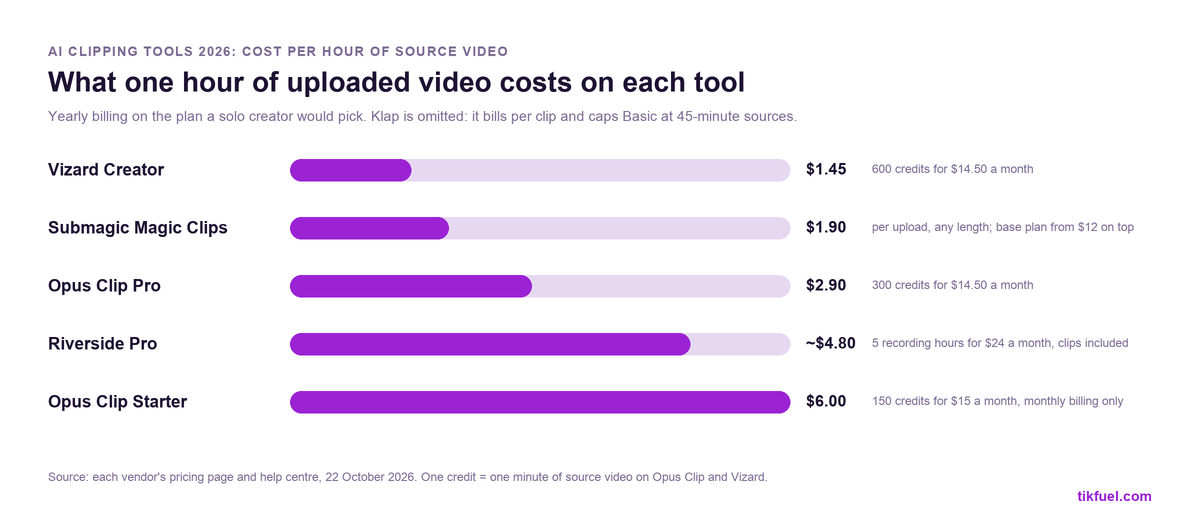
Three things to read into it.
Opus Starter is the expensive way to buy Opus. It has no yearly price, so an hour costs $6 against $2.90 on Pro yearly. If you are going to pay Opus, pay for Pro and commit for the year.
Vizard is half the price of Opus for the same job. Same $14.50 a month, 600 credits against 300. On talking-head video that is the entire difference between them.
Metering means you pay for the whole upload. A two-hour podcast costs 120 credits whether you keep thirty clips or three. Trim the source to the segments worth clipping before you upload, and on Klap or Submagic, where the meter is clips or uploads, that trimming is free.
The setting all five get wrong by default
Every tool on this list defaults to clips somewhere between 30 and 60 seconds. Our analysis of two large datasets in how long a TikTok should be found that bracket is the worst length on the platform: under 30 seconds gets the best engagement rate, over a minute gets the most reach and watch time, and 30 to 60 gets neither, while being the second most common length posted.
A clipping tool makes that mistake at scale. Thirty clips a week, all in the hole.
The fix is a setting. Opus lets you pick a clipping length from Starter up; the others have a target length in their clip settings too. Set it under 30 seconds for reaction, punchline and single-point clips, or let it run past 60 for a complete argument or story. Do not leave it on the default, and do not let the virality score, which is scored on the clip the tool chose, talk you back into the middle.
Which one to pick
- Footage without a talking head, or you want clip, post and schedule in one: Opus Clip, Pro yearly.
- Podcasts and interviews at volume, best price per minute: Vizard Creator yearly.
- Short sources, small budget, or you want an API: Klap Basic yearly.
- You cut your own clips and want the best captions and b-roll: Submagic, with Magic Clips if you want one bill.
- You already record on Riverside: Magic Clips, which you have.
- You want to test on your own footage for free: Vizard or Opus on the free plan, knowing the output is watermarked and gone in three days. Quso.ai, below, is the only tool here with a free plan meant to be used rather than trialled.
Tools we looked at and left out
Lists of AI clipping tools often run to ten or twelve names. Here is where the ones we did not rank stand.
- Quso.ai (formerly vidyo.ai). The only true recurring free plan, 75 credits a month at 720p with a watermark, and paid plans from $14.50 yearly with scheduling to seven platforms. Left out because export tops out at 1080p and the public review base is almost empty: one review on G2, one on Trustpilot. A reasonable budget pick if you can live without a track record.
- 2short.ai. The cheapest paid entry at $9.90 a month for 5 hours, with a free plan of 30 minutes a month and no watermark on any tier. No publishing, no scheduling, no analytics, so it is a clip generator and nothing else.
- CapCut. Free, and its long-to-short tool works. Left out for two reasons. Its Trustpilot is 1.2 from 1,358 reviews, 89% one-star, mostly repeated card charges. And its June 2025 terms grant it a perpetual, transferable licence to what you upload, including your likeness and voice, as widely reported at the time. Read the live in-app terms before you use it for anything with your face in it.
- Descript. A transcript editor with a clips feature, and the best tool here for editing a podcast by deleting words. Its Trustpilot has fallen to 2.6 from 290 reviews, YouTube-link import is disabled, and reviewers report credits burning on filler-word cleanup. Buy it to edit, not to clip.
- Munch. Once a clipping tool, now “Munch Studio” after a 31 December 2025 pivot to done-for-you social marketing from $38 a month billed yearly. Clipping survives as a minutes allowance inside that. The legacy Trustpilot profile sits at 1.9.
- Kapwing. A general browser editor whose Repurpose Studio charges two credits per source minute. Fine if you already pay for Kapwing; not a reason to start.
The rule we applied: it is a clipping tool if selecting the clip is its main job and it is still sold that way in October 2026. Every tool in the ranking passes. None of the six above does.
What AI clips do and do not do on TikTok
A clip is a candidate, not a result.
What the tool does is find thirty openings in an hour and save you the afternoon of scrubbing. What it does not do is make the first second land, write the caption, or post at a rhythm. The feed reads watch time before it reads anything else, and Metricool’s study of 2.3 million posts found 96% of a video’s views arrive within ten days, so a clip that opens weakly is finished before you have looked at the analytics.
The creators who get the most from these tools do three things the tool cannot. They rewrite the first line of every clip rather than trusting the AI hook. They post the clip as a native upload on each platform, not as a cross-post, which we went through in reposting TikToks on Reels. And they treat the virality score as a sort order, not a forecast: the top three by score are where to start, and the one that performs is where to make more.
Bought views do not change any of that. We sell TikTok views, and a higher count beside a clip makes it look seen; it does not make the next viewer stay. The cheaper lever is the clip-length setting two sections up, which costs nothing and fixes thirty videos at once.
Frequently asked questions
What is the best AI clipping tool?
Opus Clip for most creators, because it clips footage without a talking head and includes posting, scheduling, b-roll and an API. Vizard is the better value for podcasts and interviews, at half the price per minute and with the strongest reviews in the category. Klap is the cheapest entry, Submagic has the best captions, and Riverside is the pick if you record there.
Is Opus Clip worth it?
On Pro yearly, yes, if your footage goes beyond talking heads or you want posting and scheduling in the same tool. On Starter, which has no yearly price and costs $6 per hour of source, Vizard does the same job for a quarter of that. The free plan is a demo: watermarked, no editing, and clips that expire in three days.
Which AI clipping tool is free without a watermark?
Among ranked tools, none with a recurring free plan: Opus, Vizard and Riverside all watermark free output, and Klap gives one free video. 2short.ai offers 30 free minutes a month with no watermark, and Quso.ai 75 free credits with one. Submagic has no free plan and no watermark on any paid plan.
Opus Clip or Vizard?
Vizard if your long video is people talking and price matters: 600 credits for $14.50 against Opus’s 300, 4K export, and a Trustpilot of 4.7 from 2,522 reviews against 4.0 from 510. Opus if your footage is a stream, a vlog or a match, or if you want direct posting, a scheduler, b-roll and an API around the clips.
How many clips can you get from an hour of video?
Vizard says up to 40 and Submagic says 20 or more per upload; Opus and Klap return a scored list you trim. In practice a good hour yields five to ten clips worth posting. On the minute-metered tools an hour costs 60 credits regardless, so trim the source before uploading.
Do AI clipping tools post directly to TikTok?
Opus from its $15 Starter plan, Vizard on Creator with six accounts, Klap with unlimited accounts on every plan, Submagic on all plans, and Riverside from its Grow plan. Posting a clip as a native upload still performs better than any automated cross-post.
Is CapCut an AI clipping tool?
It has a long-to-short feature and it is free, but it is a general editor first. We left it out of the ranking because of its 1.2 Trustpilot score from 1,358 reviews and the June 2025 terms that grant it a perpetual licence to uploaded content. Use it to cut manually if you like; read the terms before uploading your face.
Why do my AI clips get views but no followers?
Usually because the clip is cut to the 30-to-60-second default, which earns neither the engagement rate of a short clip nor the watch time of a long one, and because the AI hook is generic. Change the clip-length setting and rewrite the first line. We cover the follow problem itself in TikTok views but no followers.
The short version
Opus Clip is the best AI clipping tool for most creators because it is the only one built to clip footage without a talking head, and it surrounds the clip with posting, scheduling, b-roll, an API and mobile apps. Pay for Pro yearly, where an hour of source costs $2.90; Starter costs twice that.
Vizard does the talking-head job for $1.45 an hour with the best reviews in the category. Klap is the cheapest entry at $14 a month yearly, billed per clip. Submagic has the best captions, with clipping as a $19 add-on it does not list on its pricing page. Riverside’s Magic Clips come free with recording there.
Whichever you pick, change the clip length off the 30-to-60-second default, which is the worst bracket on TikTok, rewrite the first line, and post native. The tool finds the candidate. The rest is still yours.